Thursday, October 29, 2009

interactive voice calls master

1 comments
Overviews

All-in-one, easy-to-use call control solution! Interactive Voice Call Master`s intuitive classification feature can let you divide incoming callers up to seven groups including: callers on any five lists or phonebook, callers not on all above, and hidden callers (those who conceal phone number). Then you can assign one of seven responses to each group. Possible responses includes: accept, interactive voice, busy tone, reject + send SMS, divert calls to, record conversation and mute the ringer.

Personal IVR (Interactive Voice Response) in your smartphone! If you chose IVR as a response to any group. It will answer callers of this group automatically and play a introduction greeting first, then wait callers to press keys to choose the possible actions, like transferring to other numbers, leaving a voice message, etc... Looks like you own a personal IVR!

Furthermore, IVR can play quizzes or interactive jokes with your specified friends when they are calling you! Or play a happy birthday tune to your girl or boy friend when her or he is calling on birthday, then rings to prompt you a incoming call is waiting.


What you get
?? All-in-one, easy-to-use incoming call control solution First you can define un-limited profiles to meet you demands in any situation. In a profile, you can divide incoming callers up to seven groups: callers on five lists or phonebook (you have to define the list in advance), callers not on all above, and hidden callers (those who conceal phone number). IVCM will respond each group by one of following responses accordingly:
  • Accept
  • IVR (Interactive Voice Response)
  • Send busy tone
  • Reject + send the SMS texts that you defined
  • Divert calls to (implemented by call diversion)
  • Record conversation
  • Mute the ringer
Notice! Both parties will hear a beep every five seconds when call record is processing. These beeps are generated by you phone and can’t be muted, it is used to remind both parties that call record is on going.


?? Personal and professional IVRWhen you assign a group of caller to response IVR, your phone will answer these callers automatically and respond them with a personal IVR that you recorded. An IVR is a various combination of six kind of actions. Possible actions include:
  • Key tone submenu
  • Leave a voice message
  • Transfer to an arbitrary phone number (implemented by 3-way conference)
  • Transfer to up to three arbitrary phone numbers (implemented by 3-way conference)
  • Play ringing tone
  • Return to upper menu
You can assign one of six actions to a phone key from 0 to 9, # and *. When callers press a key, the relative action will respond automatically. Choose action "Key tone submenu" will unfold a new submenu that contains 12 new keys. So you can assign actions continuously.

Notice:
IVCM is shipped with 3 predefined IVRs examples. You can try the functions of IVR with these examples and are free to modify or delete them. Of course, you can add as many new IVRs as you wish.


?? Various features to help you work easily
  • Tight integration with phone book feature help you to create customized lists easily
  • SMS templates help you to import SMS texts easily
  • Voice message box help you to replay messages and call back to original callers easily


?? Flexible scheduler
You can define one-time or per-day schedules to enable profiles run automatically at specific time. For example, you can let scheduler activate an office-profile at work and a home-profile at home automatically. Or schedule a one-time holiday profile in advance to enjoy your relax time!


?? Complete parameters can be tailored to your preference
Adjustable parameters like:
  • Auto-run at power-on
  • Show indicator when running
  • Delay before IVR answering
  • Per call transfer timeout
  • Auto hanging up timeout after call transferred by IVR
  • Ringing timeout
  • And much more...


Main features
  • Most all-around call control solution on the market
  • Un-limited, definable profiles to meet all your demand in any situation.
  • Personal and professional IVR (Interactive Voice Response)
  • Very fast and reliable key tone (DTMF) recognition engine that can work very well under a noisy environment
  • Super fast incoming call number recognition and search engine. It can determine an incoming caller whether on phonebook or a list within a part of a second, even phonebook/list contains thousands of contacts
  • Flexible scheduler to enable you activate profiles automatically
  • Real-time incoming call dialog monitoring by listening and/or looking at dialog view
  • Take over or reject a IVR-answered call anytime when IVR is still in action
  • Auto run at power-on
  • Show an indicator on phone and menu screen when running

User Guide

You can get an user guide at http://www.mobisophy.com/download/ivcm_s60_2nd_v1.50_userguide.pdf


Devices supported
  • Nokia 3230/6260/6600/6620/6630/6670/6680/6681/6682/7610/N70/N90
  • Panasonic X700/X800

Important Notice Due to a hardware limitation of Nokia 6620 and Panasonic X700/X800, these devices can`t play or record sound when a phone call is proceeding. This limitation prevents IVR and record conversation feature from working properly.

Tuesday, October 27, 2009

Facebook Usernames Coming Soon for Pages

0 comments
Below is an FAQ specifically for Page administrators on the new process and how to obtain a username for your Page.

How can I secure a Username for my Page?
If you are an administrator of a Facebook Page, you will be able to choose your username just like a user selecting a username for their profile. Go to http:/www.facebook.com/use
rname at 12:01am EDT on Saturday, June 13 and you will be prompted to choose a username for the Page you administer.

I tried to secure a name for my Page but Facebook said the Page was not eligible. What are the requirements?
Your Facebook Page must meet two requirements: it must be live on Facebook prior to the May 31, 2009 cut-off date and have a minimum 1,000 fans as of May 31, 2009.

I am an administrator for multiple Pages on Facebook, how can I secure a Username for each of them?
If you are an administrator of a Page, you will be able to choose a username for each Page at http://www.facebook.com/username beginning at 12:01am EDT on Saturday, June 13. There will be an interface for you to choose usernames for the Facebook Pages you administer.

Why should I register a username for my Facebook Page?
Usernames allow public entities to easily promote your presence on Facebook with a short URL (http://www.facebook.com/yourname). This username can be used in your marketing communications, company website and business cards.

What are the guidelines around creating a username for Facebook Pages?
Usernames were created to make it easier for Facebook users to identify their profile and share with others. As a public figure, business or brand with a Page on Facebook, your username should be straightforward and easy to remember. Facebook encourages you to consider the following when creating a username for Pages:
• Create a username that is as close as possible to your public figure or business name (e.g. AshtonKutcher, PizzaHut).
• If you own the rights to a given name, make it your username so that others cannot obtain it.
• Usernames can only contain alphanumeric characters (A-Z, 0-9) or a period (".").
• Choose a username you will be happy with for the long term. Usernames are not transferable.
• Your username must adhere to Facebook’s Statement of Rights and Responsibilities.

I accidentally selected the wrong/misspelled username for my Facebook Page. Can I revise it?
No. Once you have claimed a username by clicking the “Set Username” button, it is not possible to edit it, or to transfer your username to a different account on Facebook. Additionally, when an account is removed from the site, its username will not be made available to other users for security reasons.

Can I have more than one username for a Facebook Page?
No. Only one username is allowed per Page.

What should I do if someone’s username infringes my rights?
If you wish to report that someone’s username infringes your rights, please fill out our automated IP infringement form. The form is located at http://www.facebook.com/copyright.php?noncopyright_notice=1

I am an authorized representative for a public figure, brand or business and/or hold the rights to a trademark name. My username was claimed by another user. What can I do?
If you wish to report that someone’s username infringes your rights, please fill out our automated IP infringement form: http://www.facebook.com/copyright.php?noncopyright_notice=1

I would like to prevent individuals from registering a username that is associated with a trademark that I own.
To prevent the registration of a username that infringes your trademark, please go here: http://www.facebook.com/help/contact.php?show_form=username_rights

What is the process to request removal of an unauthorized Page of a public figure, brand or business?
If you wish to report that someone’s username infringes your rights, all you need to do is fill out our automated IP infringement form: http://www.facebook.com/copyright.php?noncopyright_notice=1

Will usernames such as “flowers” or “pizza” ever be available for Facebook Pages? Can I sign up on a waiting list?
At this time, generic words are not available as usernames. Facebook encourages all users and Page administrators to create a username that closely matches the true identity of their name or business.

For additional questions, visit the usernames Help page at http://www.facebook.com/help/?page=896


Starting at 12:01 a.m. EDT on Saturday, June 13, you'll be able to choose a username on a first-come, first-serve basis for your profile and the Facebook Pages that you administer by visiting www.facebook.com/username/. You'll also see a notice on your home page with instructions for obtaining your username at that time.


Facebook usernames will be available in basic text forms, and you can only choose a single username for your profile and for each of the Pages that you administer. Your username must be at least five characters in length and only include alphanumeric characters (A-Z, 0-9), or a period or full stop ("."). While usernames are currently available only for Romanized text, we're looking at how we might support non-Romanized characters in the future.

Think carefully about the username you choose. Once it's been selected, you won't be able to change or transfer it. If you signed up for a Facebook Page after May 31 or a user profile after today at 3 p.m. EDT, you may not be able to sign up for a username immediately because of steps we've taken to prevent abuse or "squatting" on names.

Samsung Corby Mate

0 comments

Let ur fingers talk "Samsung Corby Mate"

Unique Compact Design

Unique Compact Design

"• Four-line QWERTY keypad enables fast and easy messaging

• Hip and colorful design appeals to youth

• Compact body fits comfortably in your hand
Perfect Texting and Email

Perfect Texting and Email

"• Provides SMS, MMS and email support

• Threaded inbox makes reading messages easy

• Sliding-out QWERTY keyboard provides quick messaging access
Comprehensive SNS and IM Support

Comprehensive SNS and IM Support

"• Offers variety of Social Networking Services support

• Home screen shortcut lets you directly connect to SNS sites

• Provides multiple IM Support through Fring feature
Handy 2MP Camera

Handy 2MP Camera

"• 2MP camera with multiple shooting modes

• Supports video recording up to QVGA 15 fps

• Save photos directly to micro SD Card
Versatile Music Player

Versatile Music Player

"• Compatible with MP3, AAC, AAC+, eAAC+, WMA

• Find the song’s name and artist by recording clips

• FM radio with RDS

Samsung Corby

0 comments
http://www.samsung.com/us/system/news/content/2009/08/31/14457/20090831_m01.jpg

Seoul, Korea, September 1, 2009 – Samsung Electronics Co. Ltd, a leading mobile phone provider, today announced the availability of Samsung Corby (model: S3650), a mobile phone designed to support the digitally connected lifestyles of today’s young mobile users.
http://www.samsung.com/us/system/news/content/2009/08/31/14457/20090831_m02.jpg
The Samsung Corby, available across Europe later this month, is a full-touch handset that places users at the center of the social media revolution with a wide range of social networks support, such as Facebook, Twitter and MySpace. The new mobile complements the company’s touch screen strategy, “touch for every lifestyle,” by targeting the youth market.

“We see strong growth opportunities in this sector and will continue to pioneer new markets with innovative technology. The Corby is consistent with Samsung’s legacy of developing new products and technologies designed for specific audiences and bringing new devices quickly to market,” explained JK Shin, Executive Vice President and Head of Samsung Electronics’ Mobile Communications Division.

The device represents a complete makeover for the youth segment, with its eye-catching profile featuring two-tone diagonal contours. The Samsung Corby is notable for both its body design and colors – which mark a significant break from the way full touch phones are usually designed. It is available in bold color options such as Jamaican Yellow, Cupid Pink, Minimal White, and Festival Orange so that users can choose their favorite colors.
http://www.samsung.com/us/system/news/content/2009/08/31/14457/20090831_m03.jpg
“Globally, we are number one for full-screen touch phones and recognize the importance of social networks in the modern mobile industry. Samsung’s target audiences are at the heart of its business strategy and the design and functionality of Samsung Corby meets the needs of a highly digitally connected and style conscious youth audience – as does the affordable price point,” continued JK Shin.

The best social networking services are combined with enhanced multimedia capabilities in a compact form factor. Corby’s 2.8-inch QVGA screen delivers a quality online video experience and its quad band connectivity and support for EDGE networks means that Samsung Corby users can stay in touch regardless of their location.
http://www.samsung.com/us/system/news/content/2009/08/31/14457/20090831_m04.jpg
Samsung Corby will be available in European countries starting from mid September at approximately 150 EUR.

Monday, October 19, 2009

M Ginger

0 comments


mGinger is the first of its kind opt-in permission-based mobile marketing platform in India.
mGinger is a service providing targeted advertisements on mobile phones. The advertisements are targeted on a consumer base who have opted-in to this service. The consumer base is built through a registration process in which the consumers specify their commercial interests, maximum number of ads they would like to receive in a day, convenient time-slots and their demographic information. Apart from getting information related to their particular interests, the consumers also receive monetary incentives for every ad they themselves receive and for each ad received in their network upto two levels of referrals.
Advertisers leverage the service to search for and select consumers based on their commercial interests, location, demographics and other criteria and send specific advertisements to their target audience. And all this without the fear of incurring even a single consumer's wrath. The mGinger platform solves critical problems like content composition, cost of campaign and return on investment measurability for advertisers.


How did it all start?


mGinger.com started when Veerendra Shivhare (COO) annoyed by the deluge of spam messages every day, hit upon the idea of targeted advertising. Registering on DNC is one way to save one self from SPAM advertisements, but what about the information that you really want to read and get to know about?
His alternative: Register with mGinger, submit a mobile number, choose the categories that you wish to receive ads about, and specify the number of ads and the time they ought to be sent and you can keep your self informed on the move! But how do we get the consumer profiles updated? Simple: provide an incentive which will keep pulling the consumers back to the website!

And so, it started...

Wednesday, September 30, 2009

Airtel Live Hack and Airtel GPRS Hack

0 comments
Daily People are Searching through Google Search Engine For the Free GPRS Trick, But They Didn't Got Any One. Again I Came Up with a New Airtel Gprs Trick Which was founded by me For You, Its Working 100%. So, Why you people are giving 30 paise / 50 kb. Common Lets Enjoy with the Trick.


1. Nokia Users use this Trick for the Free Airtel GPRS.

2. Your Balance Should be less than 30 Paise. Otherwise They will Charge you for the browing.

3. You Should have two Connections for this trick to work

1. Airtel Live and
2. Mobile Office.

4. If you Don't have the settings, Set up the connections with the following Data.

For Airtel Live Connection,

Goto - Settings - Connections - Access Points - Options - Create New Access Point

And Then Enter the Following Data

Connection Name: Airtel Live
Data Bearer: Packet Data
Access Point Name: airtelfun.com
Homepage: http://wap.google.com/gwt/n

Then Goto - Options - Advanced Settings

Network Type: IPv4
Phone IP Address: Automatic
DNS Address: Automatic
Proxy Serv. Address: 100.001.200.099
Proxy Port Number: 8080

For Mobile Office Connection,

Goto - Settings - Connections - Access Points - Options - Create New Access Point

And Then Enter the Following Data

Connection Name: Mobile Office
Data Bearer: Packet Data
Access Point Name: airtelgprs.com
Homepage: http://wap.google.com/gwt/n

Then Goto - Options - Advanced Settings

Network Type: IPv4
Phone IP Address: Automatic
DNS Address: Automatic
Proxy Serv. Address: None
Proxy Port Number: 0

Setting Up Connections are Completed. If you have the two settings already, then no need to follow the above step.

5. Now Choose Web Browser on your Mobile Phone And Go to Settings and Choose Default Access Point as Airtel Live. Then Close the Browser.

6. Now Choose your Wap Brower (Service) on your Mobile Phone and Go to Settings and Choose Default Access Point as Mobile Office. Then Close the Browser.

7. Now Open ur web Browser on your Mobile and connect with Airtel Live , It will Open the home page http://wap.google.com/gwt/n

8. Without Closing that Browser, Click the Menu Button and choose your wap browser and connect it with Mobile Office, It will also open the same Page http://wap.google.com/gwt/n.

9. Thats it, Now you can see the Gprs symbol with two lines and two dots on your mobile. Now it is hacked.

10. Now Holding the menu button, Choose your web browser - Options - Go to Address and type http://www.google.com. It will open the Google Search Page.

11. Now you can open any site for Free. If you got Reply Unknown or No Reply Error, Try Reloading the page two or three times, It will work finely.

12. But the speed was little bit slower, Use the above trick with Opera Mini, Where the Speed was So Good.

For Using the Trick With Opera Mini,

1. Open Opera Mini, and type the address http://wap.google.com/gwt/n and connect it with the access point Airtel Live. (Dont Change the address, it wont work with opera Mini)

2. Wait for the Response from Opera Mini, it will display with the following message

Connection Failed
Start the Connection Test
Try Again

3. Dont worry, it will display like that Only.

4. Now open any other browser on the Mobile Phone and and open the above same address with the access point name Mobile Office.

5. It will load the Page. After the Page Gets Loaded. Without closing the browser, Now go to opera Mini and Type Any Address, It will work finely, If it is not working, try two or three times. It will work finely.

6. While Connecting you will get a error in opera mini

Content Bloced by the Operator
wml error.

7. If you got the error while browsing, then Exit the two browsers and check your mobile balance (simply check your balance) and then use the above same procedure, it will work finely.

8. You wont be able to download files more than 1.5 mb.

9. You can browse for absolutely Free.

Thursday, September 24, 2009

Tata Docomo GPRS Settings

0 comments
Connection Name : Docomo {or name it anything!}
Data Bearer : GPRS
Access Point Name : TATA.DOCOMO.INTERNET
Username :
Password :
Homepage :
Connection Security : Off
Session Mode : Permanent

GPRS is active on Docomo by default, so you just need to add this settings to start using it. On Nokia phones these settings can be added by going to “Settings–>Configurations–>New Access point”. Some phones have this setting in browser settings also. Just look for something which says “Add new access point” & add the above settings. Right now they are charging 1p/kb which is bit expensive.

to get settings from DOCOMO SERVICE
send SMS “MMS” TO 121 FOR MMS SETTINGS (WITHOUT QUOTE)
AND “DIVE” TO 121 FIR GETTING GPRS SETTINGS

Access Free Airtel GPRS

0 comments
Raw Materials: PC/Laptop and necessary connectivity tools ,ie.,
Serial/USB cable OR Infrared Device OR Bluetooth dongle to connect the mobile to the computer.

1) Activate Airtel Live! ( It’s FREE so no probs)
2)Create TWO Airtel GPRS data accounts (yep TWO) and select the
FIRST as the active profile.

3) Connect your mobile to the PC (or Laptop) and install the driver for
your mobile’s modem.

4) Create a new dial-up connection using the NEW CONNECTION
WIZARD as follows

Connecting Device : Your mobile’s modem
ISP Name : Airtel (or anything you like)
Phone Number : *99***2#
Username and Password : blank

5) Configure your browser and download manager to use the proxy
100.1.200.99 and port 8080.( My advice is to use Opera since you
can browse both wap and regular websites)

6) Connect to the dial-up account. You will be connected at 115.2
kbps (but remember, that is a bad joke).

7) Pick up your mobile and try to access any site. You will get “Access
Denied…”(except for Airtel Live!). IT DOES NOT MATTER.
Keep the mobile down.

8 ) On the PC ( or Laptop) open your browser, enter any address ,
press ENTER and…….WAIT

9) After a few seconds the page will start to load and you have the
WHOLE internet at your disposal.

10) Thank the one who gave you this hack!

Download free stuffs from Airtel Live

0 comments
Airtel has been a very successful company in the Telecom Industry in India, providing innovative services and other value addition to the customer. Also Airtel is a hot topic in most Indian forums, due to its easter eggs. You never know what you will stumble into when you dive in.

Coincidently on the easter day, I found a easter egg of Airtel. Like every online site, Airtel stores its files on servers, which one can access after completing a successful payment. I was just tinkering around with a few ip addresses when I came across a few where you can access the files directly hence avoiding the payment for that. Now download wallpapers, ringtones, games and everything you can find in the Airtel Live! Page without acctually having to pay for them. This is a very good hack considering that Airtel Live products are generally very costly and extremely over priced.

Here are the links:

10.2.0.92/cmtairtel/temp_content

10.2.0.92/cmtairtel/content

Note that these URLs can be accessed only from a Airtel Sim with Airtel Live activated. Use the built-in browser to access them since I could not view them using the Symbian Opera browser. Have fun and tell me if it works for you!

Tuesday, September 22, 2009

SONY XPERIA X2

0 comments
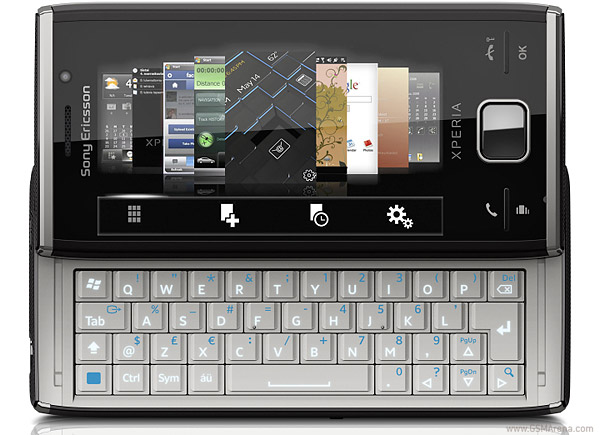
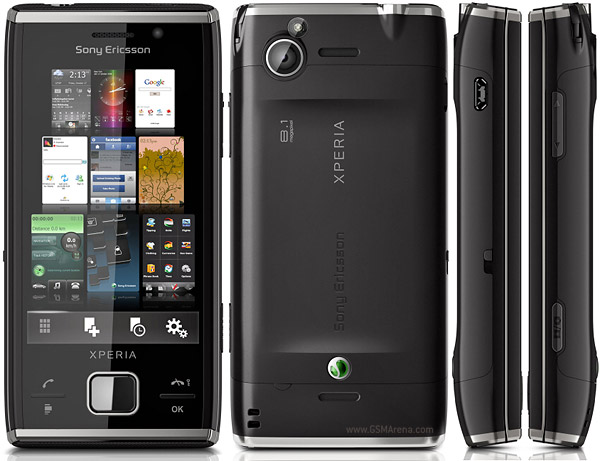
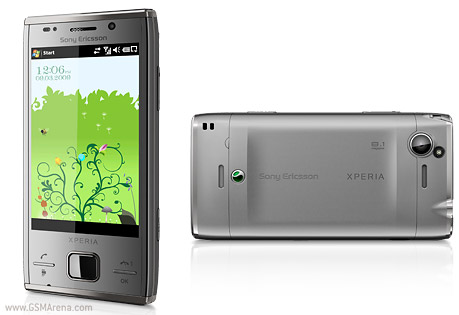
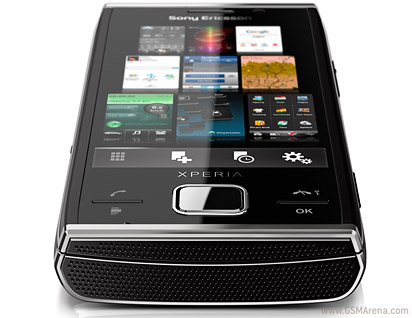
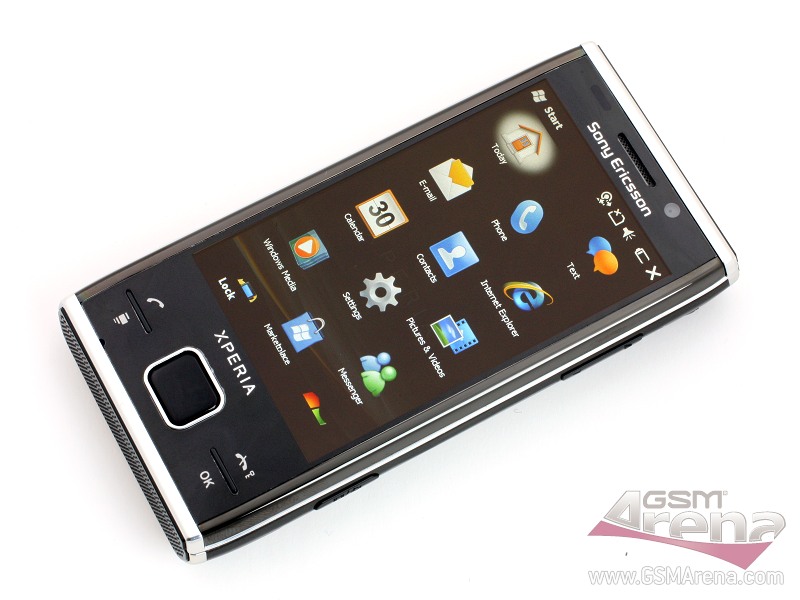
The Sony Ericsson Xperia X2 is a Windows Mobile 6.5 smartphone with an improved 3.2-inch touch screen display, new 3D panel, a slide-out QWERTY keyboard and a SlideView feature that shows frequently used phone activities, missed incoming activity, emails and text messages. The handset runs on Microsoft's new Windows Mobile 6.5 platform and has a redesigned Internet Explorer Mobile browser with Flash support, access to Windows Marketplace for Mobile and Microsoft's 'My Phone' Web backup service. Additionally, it comes with Sony Ericsson's '3D panels' options -- 14 preloaded 'buttons' with another 16 available for download -- that provide quick access services like Skype, Google, CNN and Windows Live. Extra tools include a 8.1-megapixel camera, Wi-Fi and high-speed HSDPA access, Google Maps for Mobile, TV out port and a microSD expansion slot.

Photos of  SONY XPERIA X2


Sony Ericsson’s XPERIA X3

0 comments
The image “http://www.newlaunches.com/entry_images/0909/17/Sonyericssons_XPERIA_X3.jpg” cannot be displayed, because it contains errors.


There is word that the XPERIA X3 will be available by January 2010. Now if we are to go on that prediction, we can safely be skeptical regarding the news. This is mainly because of the wretched pressure exerted on us as we wait for the X2 to come out. It is likely to be out by the fourth quarter of this year. It has a 8.1 megapixel camera, a 4 inch touch screen display, Bluetooth, Wi-fi and above all, it runs on Android OS. Well, happy waiting and make sure that you don’t curse us if the temptation is overwhelming. We’re drooling too. I really hope that the X3 comes out immediately after the X2 so that users would have two XPERIA phones to choose from.

Samsung SPD-50P91FHD - The first Bluetooth certified TV

0 comments


Samsung Korea has announced the SPD-50P91FHD a 50-inch full HD PDP TV from its PAVV Cannes line up. It features True Black Panel which supports improved full HD image and Cinema Screen mode using propreitery technologies like Ultra DayLight, Natural True Color, and Real motion studio. Samsung claims it is the world’s first Bluetooth certified TV as it is compatible with devices like Bluetooth compatible headsets and photo printers. The SPD-50P91FHD also supports ACAP standard two-way data broadcast.
 http://www.newlaunches.com/entry_images/0407/24/samsung_1.jpg

The Samsung SPD-50P91FHD is currently available in Korea for 4,300,000 KRW ($ 4600).

Thursday, September 17, 2009

Nokia Aeon

0 comments
Aeon Black

Nokia Aeon combines two touch-sensitive panels mounted on a fuel-cell power pack. Each of the panels are capable of being used independently. The touch screen displays all buttons that are virtual, so in one situation one panel could operate as the display, the other as the keypad. Nokia also establishes a new wireless standard with wibree, basically an upgraded bluetooth which would allow the Aeon to be a thin-client, farming out processing and storage.The complete phone is virtual and the panels can be used for voice calls/ sending messages and enjoying the musical experiance from any panels. It can also merge itself into other local products using the inbuilt sensors with the complete design similar to synaptics onyx and BenQ-Siemens’s Black box, replaces the complete tradional keypad.

Though this concept phone was announced a year back still there are no latest news about it regarding the launch plans etc. Nokia should use the same Material on the screen as by iPhone, otherwise you will spend half of your time in wiping its screen. Nokia's vision of wearable technology users could wear the lightweight panels as a badge, or connected to a wrist strap. The most prominent design feature of aeon is a touchscreen that stretches over the full surface area of the phone, similar to benq siemens's black box concept phone.

Nokia recently gave a glimpse of Nokia Aeon Concept Phone in the R&D section of the company’s website.
The Aeon concept phone is developed by Nokia’s research and development team and is one of the most futuristic mobile phones seen so far.
Aeon Blue
The most outstanding design feature of Nokia Aeon is the touchscreen that stretches over the full surface area of the phone. The touchscreen feature is similar to BenQ-Siemens’s Black box concept phone.
Nokia Aeon is seen in black, green and blue colors.
Aeon green
There is no word on when Aeon concept phone will be officially released to the public.

Sunday, September 13, 2009

FL Studio 9

0 comments

Introducing FL Studio 9

The image “http://flstudio.image-line.com/documents/t_AllBoxesStacked.png” cannot be displayed, because it contains errors.

FL Studio 9 is a complete software music production environment, representing the culmination of more than 10 years of sustained & focused development. FL9 is the fastest way from your brain to your speakers.


What is FL9?


FL Studio is a full-featured, open architecture, music production environment capable of audio recording, composing, sequencing and mixing, for the creation of professional quality music. The FL Studio philosophy is creative freedom:


Free your audio - Route any instrument to any mixer track. Each mixer track can receive audio from any number of instruments, any number of other mixer tracks and a soundcard input. Mixer tracks, in turn, can send audio to any number of other mixer tracks and a soundcard output. Create sub-mixes, effects chains or complex mixes. FL studio’s flexible architecture sets audio free.


Free your mind - Choose your preferred workflow, compose using the step-sequencer or piano roll. Create in pattern or track mode, then arrange your ideas in the free ‘palette’ Playlist. The Playlist presents timeline as a virtual ‘canvas’ where each Playlist track can simultaneously hold any number of score, audio and automation events. Now that’s freedom.


Instruments


Make virtually any sound - FL9 includes over 30 software synthesizers covering acoustic/synthetic bass, electric guitar, multi-sampler tools including piano & strings, general sample playback and beat-slicing (With Rex 1 & 2 support).


Synthesis techniques - span subtractive, modelling, FM, RM, granular and additive. With the addition of FL SynthMaker you can further create & share your own FL instruments, effects & MIDI control dashboards without the need to write basic code.

Open plugin standards - FL Studio supports all PC industry plugin instrument standards including VSTi (1/2), DXi(1/2), Buzz and Rewire. This means you can sequence with your favorite plugins and applications.


Audio Recording & Editing


Multi-channel audio inputs - With the ability to simultaneously capture all the inputs on your audio-interface, FL Studio has the flexibility to record a single vocalist, guitar or a full symphony orchestra.


Arranging audio - Audio can be arranged, with complete freedom in the Playlist. Features include the ability to host an unlimited number of audio recordings, time-stretching, pitch-shifting, beat-slicing, cropping, editing and the re-arranging of audio with only a few mouse clicks.


Edison - FL9’s audio capabilities are further enhanced with Edison, the recording wave editor. Edison is an integrated audio editing and recording tool with spectral analysis, convolution reverb, noise reduction, loop-recording, loop-construction tools and more.


FL Studio supports WAV, MP3, OGG, WavPack, AIFF, and REX audio formats.


Sequencing


Compose and record your musical performances and ideas in the most logical way.


Pattern or track sequencing - You choose, record your musical performances and ideas in the most logical way. FL Studio 9 can simultaneously function as a pattern and track based sequencer. Reuse patterns as Pattern Clips in the Playlist or record song-length sequences, as desired.

Step sequencer or Piano roll - Scoring tools include FL Studio’s legendary Step-sequencer, one of the most advanced Piano roll’s in any software studio, event and multipoint automation envelopes. FL Studio supports MIDI input, standard controller compatibility, and the ability to simultaneously control multiple instrument channels from separate controllers.


Arranging


FL Studio allows you to do what you want where and when you want.


Determine your own project design - In FL Studio 9, you decide how your project will be laid out. Unlike the competition, FL9's Playlist is a totally flexible and virtually unbounded workspace where Note Pattern, Audio and Automation data can be arranged and edited to suit your creative ideas and preferred workflow.


Mixing & Mastering


FL Studio provides all the tools you need to produce your tracks to high professional standards.


The mixer - FL9 includes a superb 104 track stereo track mixer that is about precision, control and flexibility. The mixer’s tracks each hold up to 8 effects (VST, DX or FL's proprietary format). To create sub-mixes or mixing chains of almost unlimited complexity, each mixer track can be routed to any other mixer track, one of 4 dedicated 'send' channels and or the Master track. Sends provide the ability to sidechain inputs to multi-input effects plugins. Finally, each of the mixer tracks can be routed to any output on your audio interface, now that’s flexibility.


Effects - What about effects? FL Studio includes more than 40 effects spanning maximization, limiting, compression, delay, distortion, equalization (graphic & parametric), filtering, phasing, flanging, chorus, vocoding and reverb. These have you covered for the creative broad-brush effects, through to the minutia of the mastering process.

Open plugin standards � FL Studio supports all PC industry plugin effect standards including VST (1/2), DX(1/2), Buzz and Rewire. This means you can mix with your favorite plugins and applications.


Lifetime free updates


There may be no such thing as a ‘free lunch’ but there certainly is ‘lifetime free updates’ with Image Line’s update policy.


Never pay for bug-fixes again! - Customers who purchase a download edition of FL Studio through our online shop receive lifetime free downloadable updates. Free updates entitles the customer to all future updates of FL Studio according to level purchased (Express, Fruity, Producer or Signature Bundle). For example, all FL Studio 9 customers will be able to download their version of FL Studio 10, 11 etc, for free.


Boxed Edition - Customers who have the Boxed version don’t miss out and can convert to lifetime free downloadable updates for a small additional fee.


Key new features and changes


Over 370 additions, changes & bugfixes featuring:


FL Studio


Sidechaining - The FL Studio Mixer 'Track Send' now has an additional 'Sidechain' mode to

support multiple-input mixer plugins.

Multi-core CPU (Hyperthreading) - Improved multithreaded generator & added multithreaded
effects processing.

Multiple controllers - Can now control multiple independent instrument channels,
assigned by MIDI number.

New volatile linking feature.

Wrapper - Aligned tick lengths checkbox for greater plugin compatibility.

Revised Playlist


Playlist track naming & icon - Tools for better song organization.

Playlist track mute controls.


Piano roll


Riff machine - Automatic sequence generator tool.

Note Grouping - New feature (works on selecting, moving, resizing,
deletion, muting, shifting using mouse-wheel).


Mixer


More tracks - Now has 99 Insert tracks (up from 64).

Multi-core CPU support - Added 'multithreaded mixer' tracks processing for
improved multi-core performance


New Plugins

Autogun (free) - Sonic adventure, Based on Ogun.


Sakura (demo)- String physical modelling instrument


Ogun (demo)- Additive metal simulation synthesizer

Gross Beat (demo) - Real-time, audio-stream playback, pitch,
position and volume manipulation effect


Stereo Shaper (free) - Mid / Side stereo processing


Vocodex - The last word in vocoders (free with Producer Edition).


Revised Plugins


SimSynth Live, DrumSynth Live, DX-10, WASP and WASP XT are
now included in FL Studio (Fruity edition upwards).

Fruity Reeverb 2 - Added Mid vs Side input signal processing.

Fruity Wrapper - Now supports multiple inputs/outputs (free).

Wavecandy - Visualization & analysis tools (free).

Fruity Limiter - Compressor section now has sidechaining (free).


Browser


Presets - Drop effect presets onto mixer tracks & channels, mixer track presets
onto effect slots and channels, channel & generator presets onto mixer
tracks & effect slots.

Windows file shell menu - Available from Browser (right-click) item menu.


See our ‘History’ page for the full list.


Demo Limitations


All FL Studio demo versions are fully featured, giving you access to features associated with the highest level of the program (Producer Edition). Compose new songs and export them to WAV, MP3 or OGG. The only limitation is that projects saved in demo mode will only open fully once FL Studio and plugins have been registered. This gives you the ability to save recover your original projects post-purchase.


Supported Formats


FL9 will fit easily within your current software supporting VST/VSTi/VST2, DXi, DXi2, MP3, WAV, OGG, MIDI, ASIO, ASIO 2, REWIRE, REX 1 & 2.


Additionally supported through DirectWave Editor: AKAI AKP (S5/6K,Z4,Z8), Battery (version 1), MPC, Reason, Kurzweil, EXS24, Kontakt (version 1 & 2), Recycle, SFZ+ and SoundFont2.


Copyright 2009 All Rights Reserved